


A large enterprise network is a complex, distributed ecosystem connecting thousands of users, millions of devices, applications, and data centers across multiple geographic regions. It spans corporate headquarters, branch offices, retail locations, distribution centers, cloud environments, remote endpoints, SaaS platforms, and hybrid infrastructure — all interconnected through routers, switches, firewalls, VPNs, and identity systems.
Working solely with Enterprise customers at runZero, the topic of “how can we effectively and accurately discover all the assets in our attack surface” comes up quite frequently. At this scale, security teams must balance availability, segmentation, and performance while defending against increasingly sophisticated threats. Asset visibility, continuous discovery, and attack surface monitoring become even more pertinent the larger the environment is.
In this guide, we’ll walk through how to optimize runZero for large-scale deployments using a hypothetical retail enterprise example.
Ex. scenario: global retail enterprise with six hour scan window #
Let’s discuss a hypothetical scenario where runZero is working with a large retail provider called ACME Corp and they want to achieve a six hour scan window for their whole infrastructure. This large retail has different brands they manage each with their own datacenter, stores, distribution centers and corporate offices. To add complexity, these brands use overlapping private IP ranges (e.g., multiple business units using 192.168.10.0/24) because they function as semi-independent entities.
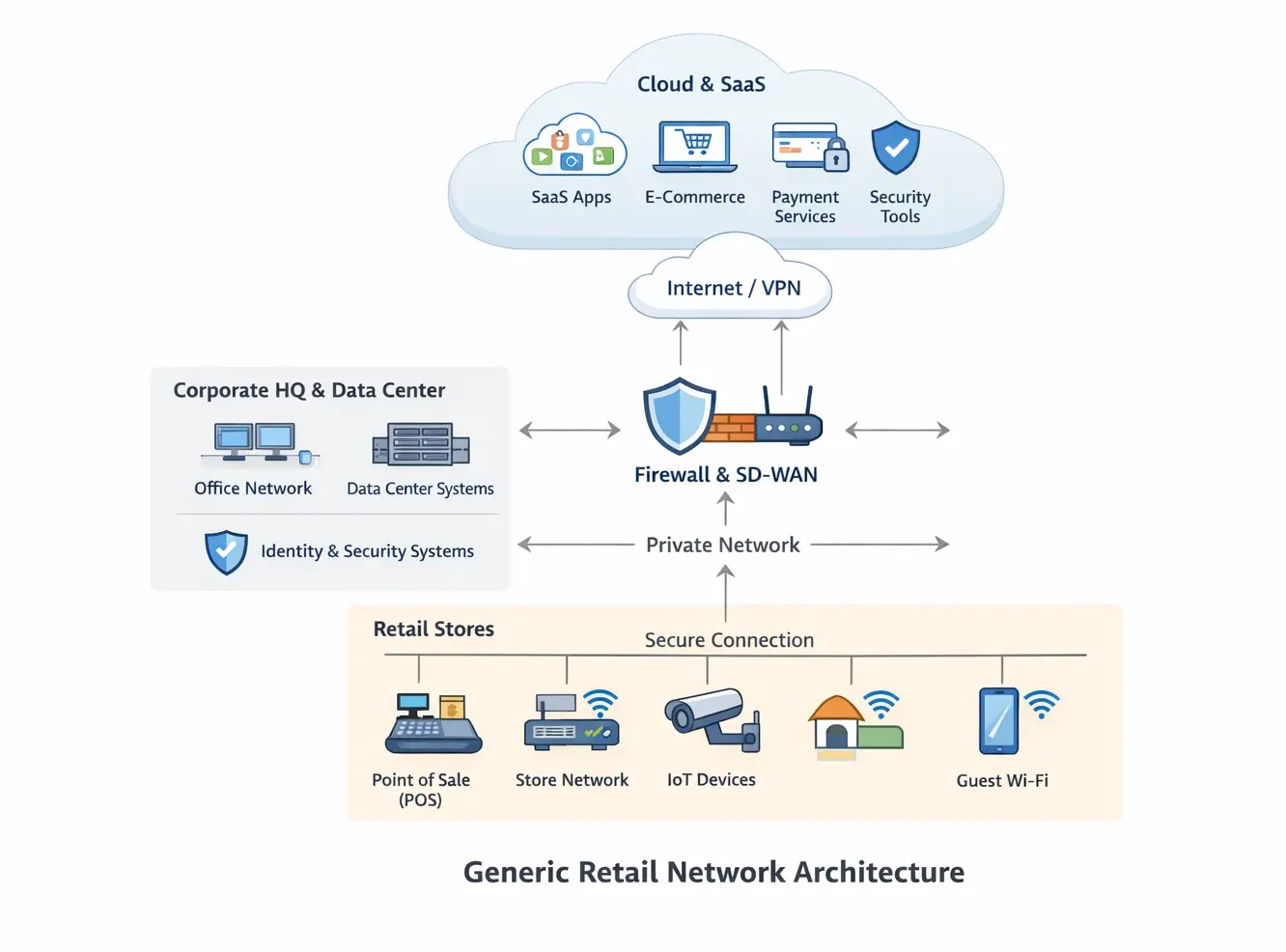
Let’s dive into how runZero offers the flexibility and options to perform effective and accurate discovery of the retail provider’s total attack surface.
Establishing the ground rules: Sites and IP organization #
First thing will be setting the foundation of IP address organization, since the brands are using overlapping IP addresses and they are distinct entities, we will leverage the concept of Sites in runZero. Sites allows enterprises to organize their data and each runZero Site is a unique view of the entire IP address space.
While many organizations use Sites to segment by geography, they are equally effective for:
- Business unit separation
- Brand isolation
- Temporary environments
- One-off testing
For ACME Corp, the best practice would be:
- Create one runZero Site per brand
- Upload subnet allocations per Site
- Apply structured tagging for reporting, dashboards, and queries
This approach ensures that overlapping IP ranges do not collide in reporting or discovery results.
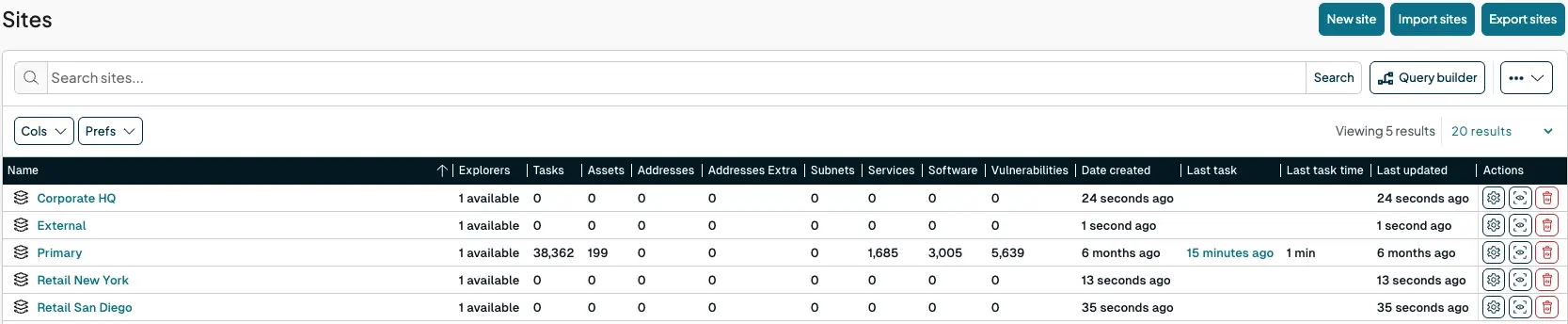
Assuming here that runZero Explorers have already been deployed to the network, the next phase is to explore the plethora of configuration options available from runZero to customize the active scans.
runZero provides several key controls that directly influence scan speed and network impact. Adjusting these settings impacts performance in terms of Explorer availability, network traffic load, and scan completion times.
Performance tuning (scan speed) #
To ensure scans complete within their scheduled frequency without overwhelming the network, runZero provides several performance tuning options. The most direct way to reduce scan time is to increase the rate at which probes are sent. Increasing the scan speed (specially for IT/IoT environments that don't have fragile devices) and dividing up the scan scope will reduce the time to cover the network scanning.
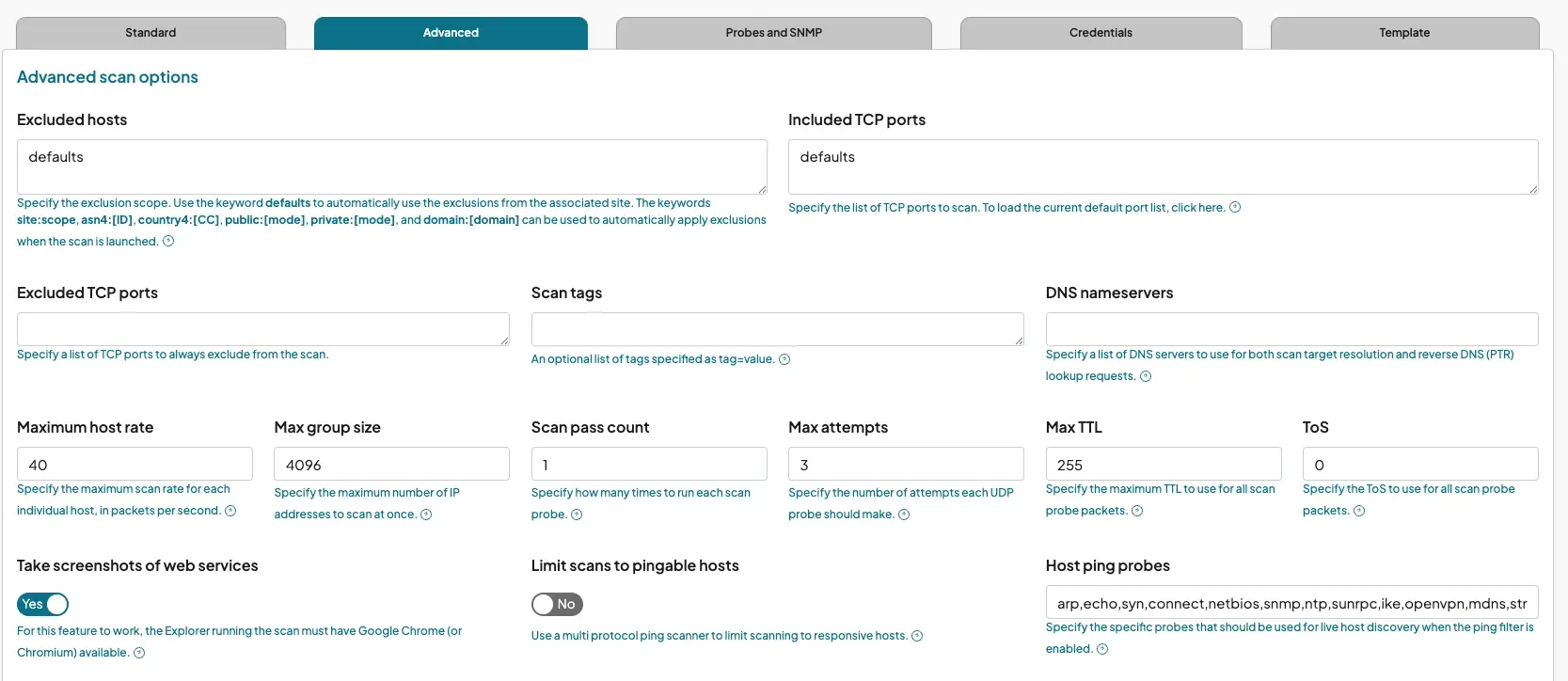
Scan Speed (Packets Per Second): The default scan rate is 1,000 packets per second. For large, robust networks (e.g., data centers or high-speed corporate LANs), increasing this significantly (e.g., 10,000+ pps) to reduce the completion time. A rate of 1,000 packets per second is standard, while 10,000+ is available for large, fast networks. However, higher speeds increase the load on the network and may cause congestion on slower links.Note: The approximate formula for scan time is `hosts × ports × attempts ÷ scan speed`. Increasing the packet rate directly decreases the duration.
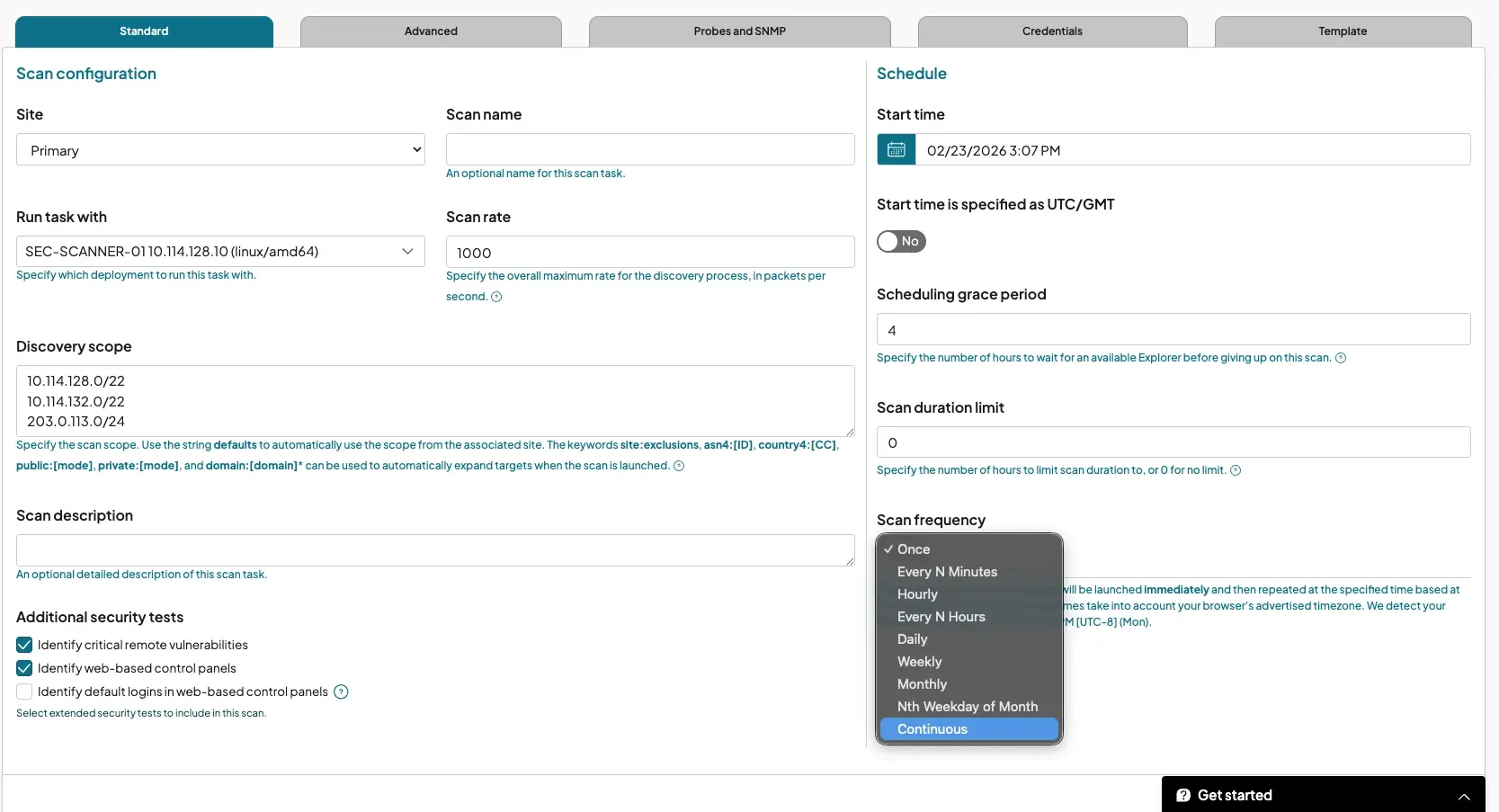
Max Group Size: This setting determines how many IP addresses are scanned simultaneously. Increasing this (default is 4,096) allows for higher concurrency, which is essential for utilizing high packet rates effectively. Reducing this number lowers the concurrency of connections, which helps prevent crashing stateful devices like firewalls and routers that have limited session tables. In enterprise environments with high-capacity infrastructure, raising this value often improves efficiency.
Max Host Rate: This limits the packets sent to a single host per second. While the default is conservative (40 pps) to protect fragile devices, increasing this for known robust segments can marginally speed up the scan of individual assets. This limits the packets sent to a single host per second. Lowering this is critical when scanning fragile IoT or OT environments to prevent device instability.
Scan frequency options #
runZero allows users to configure scans to run based on specific temporal requirements:
Scheduled and Recurring Tasks: Scans can be set to run once at a specific future date or on a recurring basis. Recurring options include standard intervals (such as daily, weekly, or monthly) as well as more granular options like "Every N Hours" or specific multiples of minutes...
Continuous Scanning: For organizations requiring near real-time visibility, runZero supports continuous recurring scans. These scans run back-to-back; as soon as one scan completes, the next begins. It is important to note that an Explorer running a continuous scan will not be able to run additional tasks unless its concurrency setting is increased beyond the default of 1.
Impact on performance and resources #
Adjusting the frequency and speed of scans directly affects the load on the network and the Explorer.
Important considerations:
- Windows Explorers are limited to a single concurrent scan task due to raw packet driver limitations. If a continuous scan is running, other tasks (such as integrations or on-demand scans) may be queued or blocked.
- Linux/macOS Explorers can perform multiple tasks simultaneously. runZero recommends keeping concurrent tasks between 1 and 4 to manage system resources effectively.
Scheduling Grace Period: To prevent scan failures caused by busy Explorers, users can configure a "scheduling grace period." This defines how long a task will wait for an available Explorer before timing out (e.g., if an Explorer is busy with a previous scan in a high-frequency schedule).
This is critical in high-frequency or distributed scan strategies.
Optimization for large IP spaces #
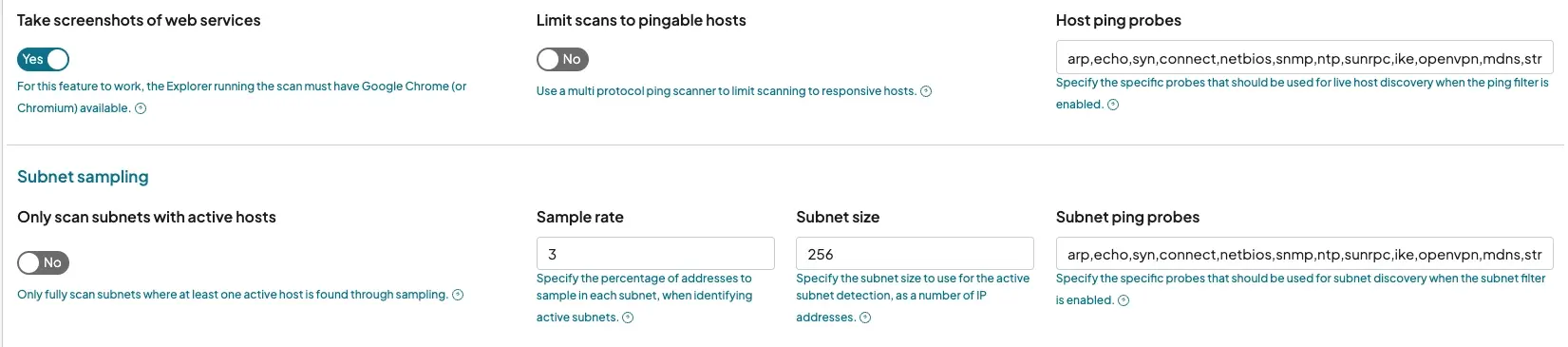
Large CIDRs such as /16 or /8 ranges can significantly increase scan time — especially when sparsely populated. To address this, runZero offers two powerful optimization methods called Prescan Modes:
Subnet Sampling: This feature speeds up discovery by sending a small number of probes to a subnet to determine if it is active before launching a full scan. This significantly reduces the time required to scan large, sparse network ranges (e.g., /16 or /8), allowing for more frequent discovery cycles. Enabling the option "Only scan subnets with active hosts" This runs a pre-scan phase where runZero samples a percentage of a subnet (default 3%). If no assets respond, the subnet is skipped entirely. This dramatically reduces wasted time in unused address space and is essential for scanning massive environments within strict windows.
Host Ping: Enabling "Limit scans to pingable hosts", in this mode, runZero first checks if a host responds to ICMP, TCP, or UDP pings. If it does not respond, the system skips the full deep-dive scan for that specific IP. This drastically reduces time but may miss assets that block pings.
This setting should be evaluated based on security tolerance and network policy.
Enforcing the window #
To ensure we are adhering to the six hour window, runZero provides a hard limit configuration.
Scan Duration Limit: A maximum duration (in hours) can be specified for a scan task. If the scan is still running after six hours, runZero will automatically cancel the task. This ensures scan activity never bleeds outside the provided six hour maintenance window.
Distributed scanning (Explorer Groups) #
A single Explorer scanning a global enterprise is often a bottleneck.
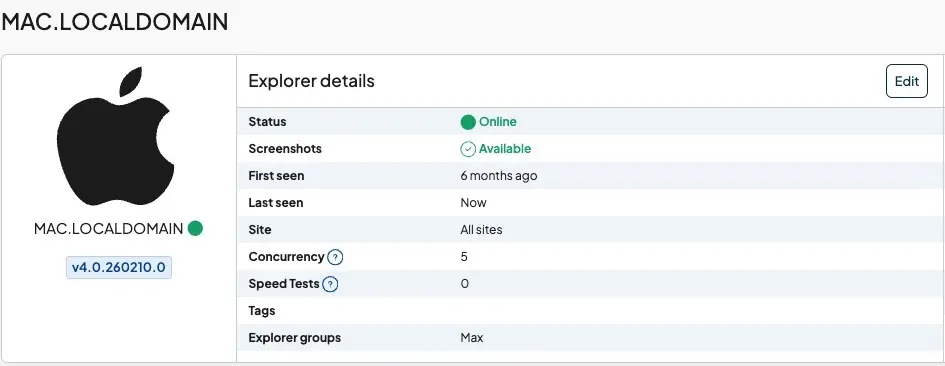
Explorer Groups: Explorers can be deployed and organized into an "Explorer Group" and when assigned the scan task to a group, the platform distributes the workload among the available Explorers in that group. This allows parallelization of the scanning effort to fit within the six hour window.
For ACME Corp:
- Deploy Explorers per data center or region
- Group them by brand or geography
- Run scans in parallel across Sites
This is often the most impactful method for achieving aggressive scan windows.

Concurrent Scans: If Linux or macOS Explorers are used, they can be configured to run multiple scan tasks simultaneously (Windows Explorers are limited to one concurrent scan). This is helpful to break a large network into multiple smaller sites and schedule them to run at the same time.
Scope management #
Exclusions: Some subnets create disproportionate delays and If there are specific subnets known to be slow (e.g., legacy networks) or that contain "tarpits" (firewalls that respond slowly to every probe), adding them to the Excluded hosts list will prevent them from consuming disproportionate amounts of time.
Adding these to the Excluded Hosts list prevents them from consuming excessive time during global scans.
This allows prioritization of high-value segments while isolating problematic areas for separate tuning.
Summary: Checklist for achieving a six hour global scan #
As a summary, to meet a strict enterprise-wide window:
✔ Deploy multiple Explorers and use Explorer Groups
✔ Segment environments using Sites
✔ Enable Subnet Sampling for large ranges
✔ Increase scan speed where infrastructure permits
✔ Adjust Max Group Size and Host Rate per segment
✔ Configure a six hour Scan Duration Limit
✔ Exclude known bottlenecks
Final Thoughts #
Large global enterprises do not fail at asset discovery due to scale and complexity but because of tool limitations and operational constraints.
runZero’s flexibility in segmentation, distributed scanning, prescan optimization, and performance tuning allows security architects to design discovery programs that are both comprehensive and operationally safe.
When configured strategically, even the most complex retail or global enterprise network can achieve accurate, repeatable asset visibility — within a defined and predictable time window.
Start a free trial or request a demo today to see firsthand how runZero can bring clarity to your most complex environments and turn visibility into your greatest security advantage.